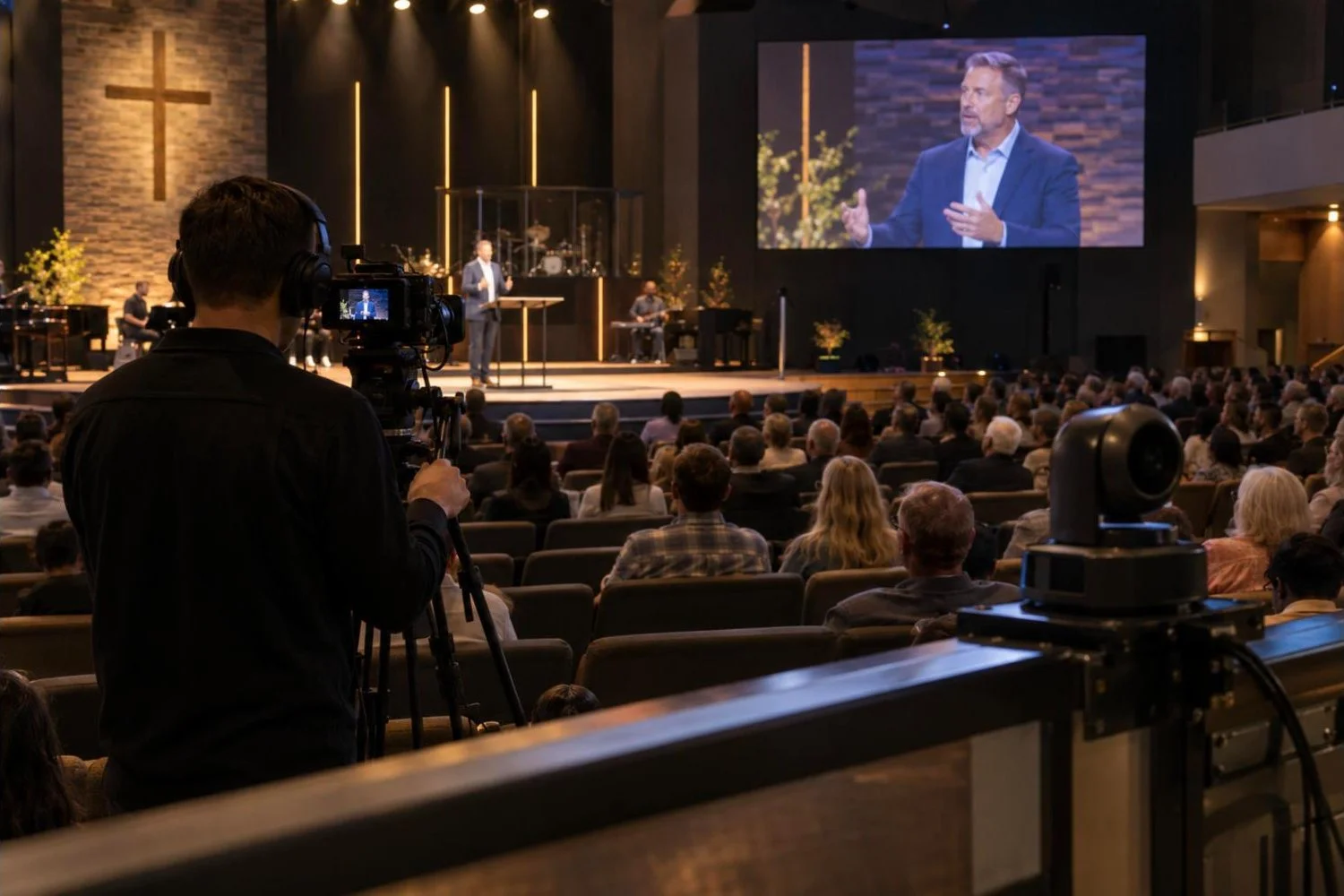
IMAG, short for image magnification, means showing a live camera shot of the pastor or worship leader on the screens in the room. In a larger sanctuary it lets people in the back see faces and expressions, and the same cameras usually feed the livestream. Done well, IMAG feels natural and keeps people connected to what is happening on stage. Done badly, it distracts with shaky shots, wrong framing or video that runs behind the sound.
This guide covers the main decisions for a church IMAG and camera system: what kind of cameras to use, how to connect and switch them, and how to avoid the problems people notice most.
Table of Contents
ToggleDo you need IMAG?
IMAG is most useful when the people in the back rows are far from the stage. As a rough guide, once the furthest seats are more than about 60 to 80 feet from the platform, facial expressions become hard to see without help. Smaller rooms may not need IMAG in the room, but still benefit from cameras for the livestream, recordings and overflow rooms.
PTZ cameras vs operated cameras
| PTZ (robotic) cameras | Operated cameras on tripods | |
|---|---|---|
| Staffing | One person can run several cameras from a controller | One operator per camera |
| Shot style | Smooth presets, slower live moves | Fluid, responsive framing that follows movement |
| Space | Mounted on walls or the balcony; no floor space | Needs camera positions on the floor or a platform |
| Best for | Churches with few volunteers, steady preaching shots | Pastors who move a lot, larger production teams |
Many churches use both: PTZ cameras for wide and side shots, plus one operated camera for the main preaching shot where smooth tracking matters most.
How many cameras?
- One camera: a locked-off or PTZ center shot for the stream. Fine for small churches starting out, but you cannot cut to another angle.
- Two cameras: a wide shot plus a close-up of the speaker. This covers most Sunday needs.
- Three or four cameras: adds side angles for the band and a second close-up, for more dynamic worship shots and a better stream.
Connecting and switching cameras
Cameras feed a video switcher, where an operator chooses which shot goes to the screens and the stream. The main options for getting video from the camera to the switcher:
- SDI is the professional standard. It runs long distances on coax cable with very low delay and locks securely.
- HDMI is cheap, but only reliable over short runs and the connectors come loose easily. Avoid it for anything permanent beyond a few feet without extenders.
- Video over IP (for example NDI) sends video over the church network. It is flexible and many PTZ cameras support it, but it needs a properly designed network and adds some delay.
For IMAG in the room, low delay matters most, which is why SDI is still common for the main path to the screens, with IP used for the stream and overflow rooms.
Avoiding the problems people notice
Lip-sync and delay
If the video on the screens runs behind the sound in the room, people notice right away: lips move after the words are heard. Every device in the chain (camera, switcher, scaler, LED processor or projector) adds a little delay. Keep the chain short, choose low-latency equipment and test it with someone speaking on stage while you watch the screen from the back of the room.
Flicker and lines on LED walls
Cameras pointed at an LED wall can show flicker or rolling lines if the camera’s shutter speed does not match the wall’s refresh. Set cameras to a shutter speed that works with your wall (often 1/60 or 1/50 of a second) and choose an LED wall with a high refresh rate. We cover this in more detail in our LED walls for churches guide.
Exposure and color
Cameras need good, even front light on faces. If the stage is dark and the screen behind it is bright, the pastor will look like a silhouette on the stream. Match the white balance on all cameras so shots do not change color when you cut between them. Our worship lighting basics guide explains how to light for both the room and the camera.
Framing
For IMAG, a medium close-up (chest up) usually works best. Leave a little space in the direction the speaker is facing, keep the eyes about a third of the way down the frame and avoid constant zooming. Simple, steady shots feel more natural to the congregation than lots of movement.
Graphics, lyrics and the livestream
A switcher can also add lower-thirds (name titles), scripture references and song lyrics over the camera shot. Many churches send a different mix to the stream than to the room: the room screens might show full-screen lyrics, while the stream shows the camera shot with lyrics along the bottom. Plan these outputs when choosing a switcher so you have enough of them. Our church live streaming setup guide covers the stream side.
Make it volunteer friendly
- Save PTZ camera presets for common positions: pulpit, worship leader, wide stage, baptistry.
- Label switcher buttons in plain words.
- Give camera operators a simple shot guide for each part of the service.
- Use a talkback or intercom system so the director can talk to camera operators without being heard in the room.
How Unity Logics can help
We design and install church camera and IMAG systems across Southern California as part of complete AV systems with LED walls, sound and lighting. We plan camera positions and lenses for your room, wire SDI and network paths, set up the switcher and presets, tune the system to keep video in sync with sound, and train your team.
See our church AV installation page, or contact us to schedule a site visit.
Frequently asked questions
What is IMAG in a church?
IMAG (image magnification) means showing a live camera shot of the person on stage on the screens in the room, so people further back can see faces and expressions clearly.
Are PTZ cameras good enough for church IMAG?
Yes, for most churches. PTZ cameras give clean, stable shots and let one volunteer run several cameras. For pastors who move around a lot, an operated camera often gives smoother tracking for the main shot.
Why is the video on our screens behind the sound?
Each device between the camera and the screen adds delay. Long processing chains, some scalers and IP video can add enough delay to notice. Shortening the chain and using low-latency equipment usually fixes it.
Can the same cameras be used for IMAG and the livestream?
Yes. Most churches use one set of cameras and a switcher with separate outputs for the room screens and the stream.